Business Entity Search MD: 6 Easy Steps to a Reliable Maryland Lookup
Source:https://lastmagazinepro.com/
If you’re trying to confirm whether a company is legally registered in Maryland, a business entity search MD is the fastest way to get a real answer. Instead of relying on a business’s own website or a random directory listing, you’re checking the state’s own records directly.
Maryland keeps a public database of every registered business entity corporations, LLCs, partnerships, and more. An entity search lets you pull up that record in a few clicks, whether you’re vetting a vendor, double-checking a potential business partner, or just doing basic due diligence before signing anything.
This guide walks through what a Maryland business entity search actually shows you, how to run one step by step, what the different status labels mean, and how to fix the most common issues people run into along the way.
What Is Business Entity Search MD?
A business entity search MD is the process of looking up a company in Maryland’s official business records to confirm its legal name, entity type, and current standing with the state.
Every business operating formally in Maryland from a single-member LLC to a large corporation has to file registration paperwork with the state. That filing becomes part of the public record, and an entity search is simply how you access it.It’s worth knowing the difference between an entity search and a general business lookup. A general lookup (like a Google search) tells you what a business says about itself. An entity search tells you what’s actually on file legal name, registration date, current status, and more. The two aren’t the same thing, and only one of them is a legal source of truth.
How to Use Business Entity Search MD
Here’s the process broken into four simple steps.
Step 1: Open the Maryland Business Search
Start with Maryland’s official business search portal rather than a third-party site. This ensures you’re looking at current, state-verified information rather than a cached or outdated copy.
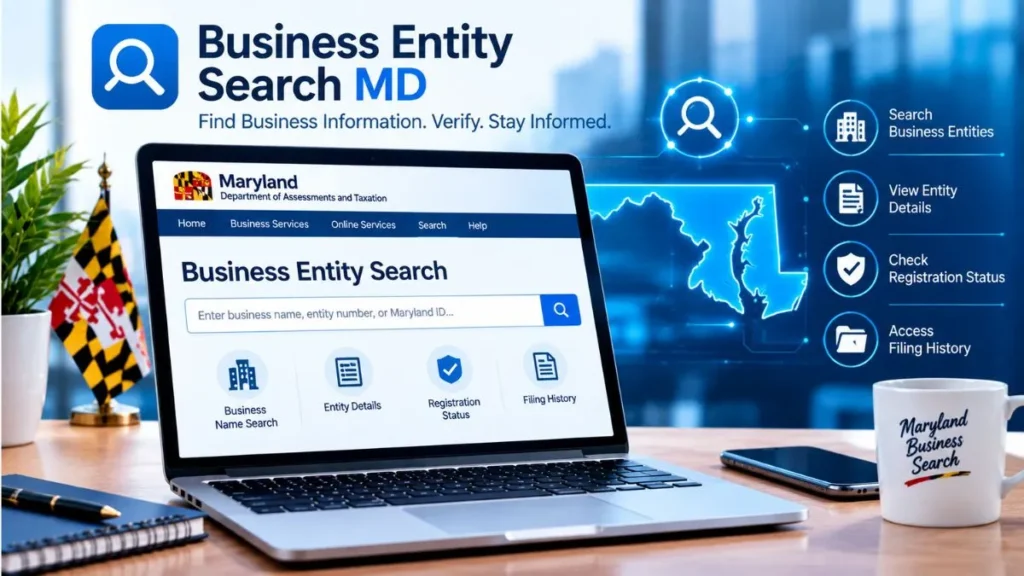
Step 2: Enter Business Information
You can typically search using:
- Business name
- Department ID (if you already have it)
- Other available identifying details
If you’re not sure of the exact legal name, a partial name search usually works fine.
Step 3: Review Search Results
Once you search, you’ll get a list of matching businesses. Take a moment to verify the exact business name, especially if multiple companies share similar names this is common with generic business terms.
Step 4: Open the Business Record
Selecting the correct match opens the full record, which typically includes:
- Entity status
- Registration details
- Filing information
- Business address, where publicly available
That’s the entire process from start to finish, and it usually takes less than a minute once you know what you’re looking for.
What Information Can You Find?
A typical Maryland business record includes:
- Business or entity name
- Entity status
- Formation or registration date
- Department ID
- Registered agent information, when available
- Filing history and related records
Not every field is filled in for every entity, but this covers what you’ll generally see.
Business Entity Status Explained
Understanding status labels is one of the most useful parts of running this kind of search.
1. Active
The business currently appears active in state records, meaning it’s authorized to legally operate as registered.
2. Dissolved
The entity has been dissolved, meaning it’s no longer operating as a legal business under that registration.
3. Forfeited or Not in Good Standing
This generally means the business has missed a filing requirement or fallen out of compliance with the state in some way. It doesn’t always mean the business has fully closed, but it’s a signal worth taking seriously always check the official record for the specific reason before drawing conclusions.
Why Use a Maryland Business Entity Search?
People run these searches for a range of practical reasons:
- Verifying a business before working with it
- Checking whether a company is actually registered
- Researching business ownership or registration details where publicly available
- Confirming current entity status
- Finding relevant filing information for legal or compliance purposes
In short, it’s how you replace assumptions about a business with something you can actually verify.
Business Entity Search MD vs. Business Name Search
These two sound similar but aren’t quite the same thing.
A business name search is often just a quick check to see if a name is available or already in use useful when you’re naming a new company. A business entity search, on the other hand, digs into an existing registration to confirm status, filing history, and other formal details.
If you just need to know whether a name is taken, a name search is enough. If you need to verify that a business is legitimate and currently active, you need the full entity search.
Common Search Problems and Solutions
Even simple searches can hit a few snags:
- Business name not found: often due to a slightly different registered name than expected.
- Too many search results: common with generic or widely used business names; narrow by entity type or location.
- Spelling variations: try alternate spellings or drop suffixes like “LLC” or “Inc.”
- Incorrect entity information: double-check the Department ID or name before assuming the record doesn’t exist.
- Outdated or unavailable records: some very recent filings take time to appear; try again after a few business days.
Quick Answers
1. What is business entity search MD?
It’s the process of searching Maryland’s official business records to confirm a company’s legal name, entity type, and current status. Rather than relying on marketing claims or third-party listings, it gives you verified information straight from the state’s own filing system, which is useful for due diligence, verification, or general research.
2. How do I search for a business in Maryland?
- Open Maryland’s official business search portal.
- Enter the business name or Department ID.
- Review the list of matching results.
- Select the correct entity to view its full record.
3. Is Maryland business entity search free?
In most cases, basic search access is free to the public, though certain certified documents or detailed filings may carry a fee. Always check the official state portal directly for current access details and any applicable costs before assuming what’s included.
4. What information can I find about a Maryland business?
- Legal business name
- Entity status
- Registration or formation date
- Department ID
- Registered agent details, when available
- Filing history
5. How can I check if a Maryland business is active?
Search for the business by name, open its full record, and check the listed status field. If it shows “active,” the business is currently authorized to operate under that registration. Any other status is worth investigating further before moving forward with that company.
Maryland Business Records and State Registration
Maryland’s business registration system covers companies across the entire state, including businesses based in Baltimore and other major areas. Regardless of where in Maryland a company operates, the same statewide entity search applies — there’s no need to search separately by city or county for basic registration status.
This is one advantage of a state-level entity search over local directories: one search covers the full state, using the same official Maryland business records system.
Frequently Asked Questions
Q1: How do I find a company in Maryland?
Use Maryland’s official business search portal and enter the company’s name or Department ID. Review the matching results and open the correct record to see its full registration and status details.
Q2: How do I verify a Maryland LLC?
Search for the LLC by name in the state’s business records, confirm the entity type matches, and check its current status. An active status generally confirms the LLC is legally operating as registered.
Q3: Can I search Maryland business records by name?
Yes, name-based search is the most common method. Both exact and partial name searches typically work, which is helpful if you’re unsure of the exact legal name on file.
Q4: How do I check a company’s status in Maryland?
Locate the correct business record through the state search portal and review its status field, which will show whether the company is active, dissolved, or otherwise not in good standing.
Q5: Where can I find Maryland business filing information?
Filing history is usually available within the full business record once you locate the correct entity. This can include formation documents, amendments, and other filings on record with the state.
Q6: What’s the difference between an entity search and a name search?
A name search typically checks whether a business name is available or in use. An entity search goes further, confirming the registration, status, and filing history of an existing business.
Q7: Do I need an account to search Maryland business records?
Basic searches generally don’t require an account, though accessing certain documents or certified copies may require additional steps. Check the official portal for specific requirements.
Conclusion
A business entity search MD gives you a direct, reliable way to confirm whether a Maryland company is legitimately registered and in good standing without relying on secondhand information. The process itself is straightforward: search by name or Department ID, review the results, and check the status and filing details on the official record.
Whenever you’re making a decision based on a business’s legal standing, go straight to Maryland’s official records rather than a directory or the company’s own claims. It’s a small step that can save you from a costly mistake later.
Read More Informative Articles:
- Michigan LARA Business Entity Search: 5 Easy Ways to Find a Business
-
IL Secretary of State Business Search: 7 Easy & Powerful Ways
-
Illinois LLC Search: 5 Easy Steps to Verify Any Business (2026 Guide)

Sobia is an SEO Expert and Content Writer specializing in keyword research, SEO optimization, and engaging content that improves search rankings, drives organic traffic, and enhances online visibility.