Michigan Corporation Search 2026: Powerful & Easy Business Lookup
Source:https://lastmagazinepro.com/
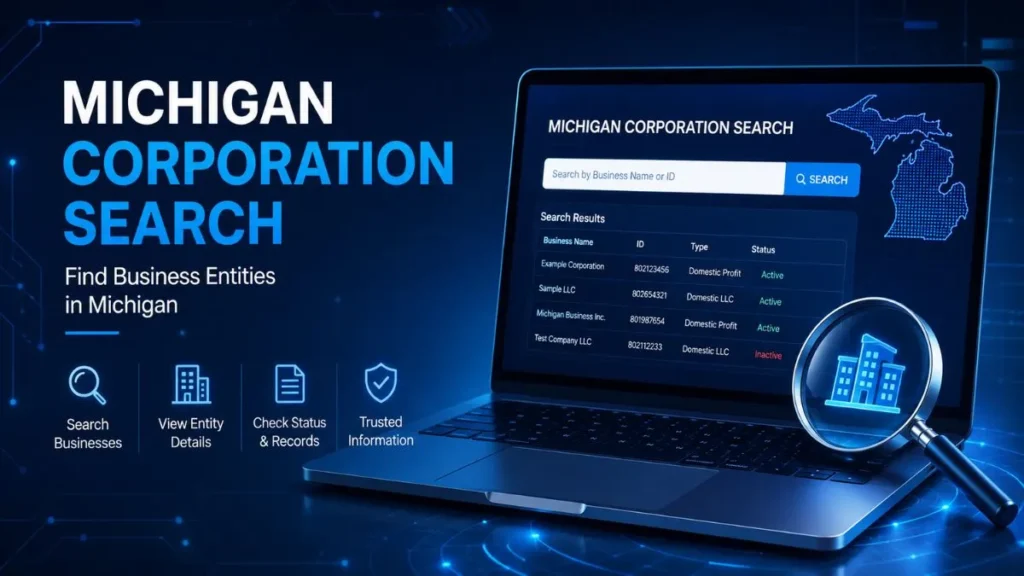
A Michigan corporation search lets you look up any corporation, LLC, or other registered business entity in Michigan through the state’s official records. In under a minute, you can confirm whether a company is legally registered, check its current status, and pull up basic filing details all for free, straight from the Michigan Department of Licensing and Regulatory Affairs (LARA).
Whether you’re vetting a potential vendor, double-checking a contractor before signing anything, or just curious whether a business name is already taken, this guide walks through exactly how to search, what the results actually tell you, and how to avoid the most common mistakes people run into.
What Is a Michigan Corporation Search?
A Michigan corporation search is a lookup performed against the state’s business entity database to find the official record of a corporation registered to do business in Michigan. It draws on public filings submitted to LARA’s Corporations, Securities & Commercial Licensing Bureau the office that processes formation documents, annual reports, and other filings for every business entity in the state.
People turn to this kind of search for a range of reasons:
- Business owners confirming a name is available before filing.
- Entrepreneurs researching competitors or potential partners.
- Customers and consumers verifying a company is a real, registered business.
- Attorneys and accountants confirming a client’s or opposing party’s entity status.
- Researchers and journalists gathering background on Michigan companies.
A typical record includes the entity’s legal name, its status, when it was formed, and where its registered office is located — details covered in more depth below.
How to Perform a Michigan Corporation Search
Michigan’s business filings are searched through the MiBusiness Registry Portal, LARA’s online filing and lookup system. Here’s the process:
- Go to LARA’s official Business Entity Search page. Navigate to Michigan.gov’s LARA section or search directly for “MiBusiness Registry Portal” to reach the state’s official tool avoid third-party sites that charge for information the state provides free.
- Choose your search option. You can typically search by entity name, filing/ID number, resident agent name, or individual officer name, depending on what information you’re starting with.
- Enter the corporation or business name. Type in the name as accurately as you can. If you’re not sure of the exact legal name, start broad.
- Review the matching results. The portal returns a list of entities that match or closely resemble your search term.
- Open the relevant business record. Click into the specific entity to view its full filing history and details.
- Check the available company details. Review status, formation date, registered office, and filing history before drawing any conclusions.
What Information Can You Find?
A Michigan business entity record typically shows:
- Business name (and any assumed names or DBAs on file)
- Entity type (corporation, LLC, LP, LLP, nonprofit, etc.)
- Business status (active, dissolved, etc.)
- Identification or filing number
- Registered office and resident agent information
- Formation or qualification date
- Annual report/statement filing history, when available
Keep in mind the record shows what’s on file with the state it’s a snapshot of official filings, not a full financial or legal history of the company.
Michigan Corporation Search by Business Name
Name-based searching is the most common way people use the tool, and it’s worth understanding how it behaves before you assume “no results” means “no such company.”
1. Exact vs. partial searches: An exact match search looks for the precise name string you enter, while a partial or “starts with” search casts a wider net and returns anything containing that text. If you’re not confident of the exact legal name, a partial search is usually the safer starting point.
2. Spelling and naming variations matter. Businesses often register under slightly different formats than their public-facing brand name for example, a company marketing itself as “Great Lakes Coffee” might be legally filed as “Great Lakes Coffee Company, LLC” or “Great Lakes Coffee Co.” A search for the exact consumer-facing name can come up empty even though the entity is registered. Try dropping suffixes like “LLC” or “Inc.,” and consider searching for just the distinctive part of the name.
3. Assumed names and DBAs. If a company operates under a “doing business as” name, that DBA is often filed separately from the legal entity name. Searching the DBA may return different results than searching the underlying legal entity.
How to Check a Michigan Corporation’s Status
Every registered entity in Michigan carries a status that reflects its current standing with the state. Common statuses include:
- Active / In Good Standing: the entity is current on its required filings and authorized to operate.
- Not in Good Standing: the entity has missed a required filing, such as an annual report or statement, but hasn’t been formally dissolved.
- Dissolved: the entity has been administratively or voluntarily dissolved and is no longer authorized to conduct business.
- Automatic Dissolution: the state has dissolved the entity for failing to file required reports over a period of time.
Checking status matters more than people often realize. If you’re about to sign a contract, extend credit, or enter a partnership, confirming the other party is an active, properly registered entity is a basic and free piece of due diligence. A business that shows as dissolved or not in good standing may not have the legal authority to enter binding agreements in the way you’d expect.
Michigan Corporation Search vs. LLC Search
Corporations and LLCs are both searchable through the same LARA database, but they’re distinct entity types with different structures and filing requirements.
| Feature | Corporation Search | LLC Search |
|---|---|---|
| Main entity | Corporation | Limited Liability Company |
| Search purpose | Find corporation records | Find LLC records |
| Business details | Registration and filing information | Registration and filing information |
| Useful for | Corporate verification | LLC verification |
In practice, the search process is identical the same portal and the same search fields work for both. The distinction shows up in the record itself, where the entity type field tells you whether you’re looking at a corporation, an LLC, or another structure such as a limited partnership or professional entity.
Why Use a Michigan Corporation Search?
- Verify a business actually exists before assuming a company or vendor is legitimate.
- Check current status to confirm a business is active and authorized to operate.
- Research companies before signing contracts, extending credit, or forming a partnership.
- Support name research when choosing a name for a new business.
- Locate publicly available entity information, such as registered office details or filing dates, for research or professional purposes.
Common Problems When Searching
A handful of small mistakes account for most “I can’t find it” frustration:
- Incorrect spelling. Even a single typo in the entity name can return zero results.
- Using an incomplete business name. Leaving out “LLC,” “Inc.,” or “Company” sometimes changes what the search matches try both with and without the suffix.
- Too many matching results. Common or generic business names can return dozens of similar entries; narrowing by location or entity type helps.
- Searching for a DBA instead of the legal entity name. An assumed name and the underlying registered entity aren’t always searchable the same way.
- Confusing corporations with other entity types. A business might be structured as an LLC, LP, or nonprofit rather than a corporation, so it’s worth searching without assuming the entity type in advance.
Frequently Asked Questions
Q1: What is a Michigan corporation search?
It’s a lookup of Michigan’s official business entity records to find a corporation’s registration details, status, and filing history through the state’s public database.
Q2: How do I search for a corporation in Michigan?
Go to LARA’s MiBusiness Registry Portal, enter the business name or filing number in the search field, and review the matching results to open the full entity record.
Q3: Can I search for a Michigan corporation by name?
Yes. Name-based search is the most common method. You can search by exact or partial name, and it helps to try variations if the exact legal name isn’t known.
Q4: How can I check if a Michigan corporation is active?
Open the entity’s record and check the status field, which shows whether it’s active, not in good standing, dissolved, or otherwise inactive.
Q5: What information does a Michigan business record show?
It typically shows the business name, entity type, status, filing or ID number, registered office and resident agent, formation date, and annual filing history.
Q6: Is a Michigan corporation search free?
Basic business entity information is searchable online for free through LARA’s public portal. Certain documents, certified copies, or expedited services may involve a fee.
Conclusion
A Michigan corporation search is one of the simplest forms of due diligence available to anyone doing business in the state free, public, and quick to run. Whether you’re confirming a vendor’s legitimacy, researching a competitor, or just checking whether a name is taken, understanding how to search effectively and how to read the resulting record will save you from acting on outdated or incomplete assumptions about a company.
Read More Informative Articles:
- Michigan LARA Business Entity Search: 5 Easy Ways to Find a Business
- IL Secretary of State Business Search: 7 Easy & Powerful Ways
- Illinois LLC Search: 5 Easy Steps to Verify Any Business (2026 Guide)
- IL Business Search: Easy, Fast & Complete Guide 2026

Sobia is an SEO Expert and Content Writer specializing in keyword research, SEO optimization, and engaging content that improves search rankings, drives organic traffic, and enhances online visibility.